Categories
Articles Windows Windows Server

Clearing IIS Logs at Regular Intervals on Windows Server

Internet Information Services (IIS) is a component that provides web server services on Windows Server. IIS records log files to monitor website performance and detect issues. However, over time, these log files can unnecessarily consume disk space. In this guide, we’ll look at how to clean up IIS logs on Windows Server.

Step 1: Determine the Location of IIS Logs ...  READ MORE ❯❯❯

Categories
Articles SQL Windows

Azure Data Studio or SSMS — which should I use?

Azure Data Studio (ADS) and SQL Server Management Studio (SSMS) are both database management tools used for different purposes, and which tool to use depends on your needs and preferences.

Azure Data Studio (ADS): ...  READ MORE ❯❯❯

Categories
Articles SQL

What is SQL Server Management Studio (SSMS) and How to Install it?

SQL Server Management Studio (SSMS) is the official tool used for Microsoft SQL Server database management and query operations. SSMS enables you to create, edit, back up, and execute data queries within databases. Additionally, you can configure security settings and monitor database performance in SQL Server.

The core functions of SSMS include:
1.Database Management: SSMS allows you to create, delete, rename, and edit SQL Server databases. It provides graphical interfaces and commands for managing your databases. ...  READ MORE ❯❯❯

Categories
Articles SQL

Finding Active and Inactive Databases in SQL Server

To find active and inactive databases in SQL Server when you have a large number of databases, you can use the following code:

CREATE TABLE #T (dbName varchar(100),last_user_seek datetime,last_user_scan datetime,last_user_lookup datetime,last_user_update datetime)
declare @dbId as int
declare @dbname as varchar(100)
declare crs cursor for select dbid,name from sysdatabases 
open crs
fetch next from crs into @dbId,@dbname
while @@FETCH_STATUS=0
begin
Insert Into #T 
Select @dbname,
last_user_seek = MAX(last_user_seek),
last_user_scan = MAX(last_user_scan),
last_user_lookup = MAX(last_user_lookup),
last_user_update = MAX(last_user_update)
From
sys.dm_db_index_usage_stats
WHERE
database_id=@dbId

fetch next from crs into @dbId,@dbname
end 
close crs
deallocate crs 

select * from #t 
drop table #t

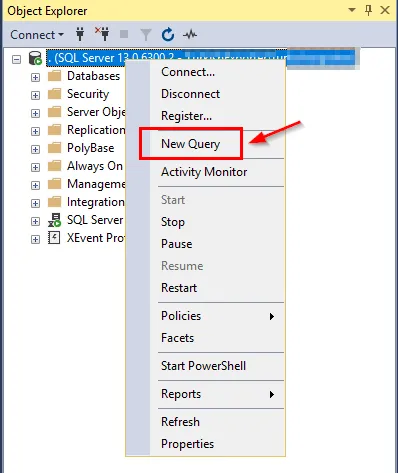
Here are the steps to execute this query in SQL Server Management Studio (SSMS): ...  READ MORE ❯❯❯

Categories
Articles SQL

Index Maintenance in SQL Server: Determining REORGANIZE and REBUILD Operations

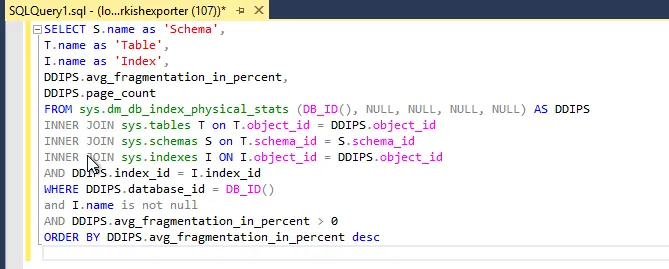
The concept of using SQL queries to determine and rectify the fragmentation rates of indexes is quite important. This query serves as a useful tool to understand how indexes require maintenance for improving the performance of databases. I will explain the process of using the provided SQL query to check index fragmentation rates and perform necessary corrections when needed.

SQL Query: ...  READ MORE ❯❯❯